Installing PostmarketOS on a Nexus 7 tablet
Some years ago at work, probably in 2015, I was given a Nexus 7 tablet. It's a pleasant little Android device, a cute 7-inch tablet. As I recall, this was a prize for some minor act of software engineering citizenship on my team at Google; I want to say it was for deleting a bunch of dead code; I remember getting nice prizes for that and for maintaining our team's documentation, among other things. Google software engineering culture was pretty good at the time. It might still be; I don't know.
The tablet came stock with vanilla Android, but for whatever reason I decided to install Cyanogenmod and then I promptly didn't use it much. There aren't many situations where I want a tablet – for something quick I can use the phone in my pocket, and if I'm at home or at work, then I have a laptop or desktop, and I prefer typing on a good keyboard. And I read physical books in bed. So... when would I use a 7-inch tablet, as nice of a thing as this is?
It went in a storage tub in my office.
This past year or two I've been increasingly excited about sustainability in computing, making use of what we already have, lean software and so forth. So I was eyeing that storage tub and thinking, what do I already have that I could be putting to use? Could I turn the tablet into a nice little minimal-distraction writing/programming device, something like Veronica The Linux Mom's "writerdeck”.
A little bit of research later, I found about postmarketOS , which is a version of the already quite-lean Alpine Linux meant for older computers and out-of-support mobile devices. And postmarketOS supports this particular tablet! Here's the process I went through for installing postmarketOS on the Nexus 7.
figuring out which Nexus 7 I had
It turns out that there are a few different hardware revisions for the Nexus 7; grouper, tilapia and flo. Mine happens to be a grouper version. This was surfaced in the old bootloader that I seem to have installed when I put Cyanogenmod on the device a decade ago, so that was helpful to find out.
updating the bootloader
The first recommended step in installing postmarketOS for the Nexus 7 is updating the bootloader software to U-Boot. The instructions here seem long and involved, but I was able to get through them with an Ubuntu desktop machine basically without a hitch. At the end of it, I had successfully (a) installed U-Boot and (b) made the tablet no longer boot into the previously usable copy of Cyanogenmod that it had.
I can't stress this enough – that webpage looks long and intimidating, but I just did all the things on the page in the recommended order (it all seemed reasonable), and it 100% worked for me on Ubuntu 24.04 LTS.
getting a build of PostmarketOS
A bootloader is nice and all, but we want the actual full Linux distribution. There are a few different ways to get it, and not all of them work for every device.
First off, there's the web installer at flash.postmarketos.org, which has two caveats – it only works on Chromium-based browsers, and it only supports a limited number of devices. But if you have Chrome/Chromium/etc, and you have one of those devices, you're set! The Nexus 7 is not on that list.
Secondly, there's this offline GUI tool ubports installer, developed by the Ubuntu Touch folks, which seems great if your specific device happens to be supported by it. It seems very convenient if you happen to have one of those. Again, not useful for a Nexus 7.
Thirdly, there's this lovely command line tool pmbootstrap, which does a lot of different things. It can download and build all the postmarketOS software and configure it in a chroot (this feels kind of like installing Gentoo in the early 2000s) and then build a complete flashable image for your device, and then flash it.
Finally, what I actually went with was downloading a pre-built image, which was simpler and ended up working for me! You can download pre-built images for the Nexus 7 and similar devices here; there are different versions for different devices.
failing to flash PostmarketOS onto the device
I tried for quite some time to try to get pmbootstrap to flash the device with the new postmarketOS image. And then I tried to get fastboot to flash the prebuilt image, but this turned out to be a mistaken approach.
What I thought I needed to figure out was the name of the partition on the device so that I could run something like fastboot flash system 20260803-1242-postmarketOS-edge-xfce4-0.6.0-nvidia-tegra-armv7.img, but it turns out that the error message was somewhat unhelpful – it turned out that having the device in fastboot mode was not sufficient for flashing onto the storage. Some devices have their storage flashable in this state I think, but not all, and specifically not mine. I might have figured this out faster if I had read this wiki page more carefully.
It's also possible that I might have been able to flash the postmarketOS image to the device if I had done the strategy in the instructions for installing U-Boot, where you connect the device to USB while holding volume-down. But I was imagining that putting the device in fastboot mode would let me flash it straightforwardly. No dice!
actually getting PostmarketOS onto the device
I went to the postmarketOS IRC channel (which is pleasantly bridged to Matrix) to ask for help, and a helpful user told me what to do almost immediately! Their recommendation was to have the tablet mounted as USB Mass Storage (UMS) from the Linux PC. There's an option for this in U-Boot – the first one on the menu in fact! – and then I could just blit an image onto the device with dd. UNIX treating everything as a file to the rescue!
My command to actually install postmarketOS ended up looking like this (obviously don't do this yourself if your device isn't on /dev/sdd)
sudo dd if=20260803-1242-postmarketOS-edge-xfce4-0.6.0-nvidia-tegra-armv7.img of=/dev/sdd bs=1MThen I did sudo sync just to be sure, powered off the drive from the Disks gui tool, rebooted the tablet... and when U-Boot came back up, it booted into postmarketOS and I was looking at a cute minimalist little XFCE interface on my tablet! And right off the bat, the touchscreen and the wireless worked, and I got on my home wireless.
I used the on-screen keyboard to install neovim and git and openssh, and noticed that I was almost entirely out of disk space already, but I could ssh into the other computers on my LAN.
resizing the partitions
I asked on the IRC again, what to do with a root partition that was way too small – the partition was only as big as the disk image I had downloaded, which makes sense! And the same helpful user recommended that I just mount the tablet storage as USB Mass Storage again in the same way (from the U-Boot) menu and then resize it from the Linux PC.
And I did just that! I opened up /dev/sdd in the Disks GUI tool on Ubuntu, saw that there was a bunch of unallocated space on the disk, right-clicked on the root partition where postmarketOS was installed, and resized it in the GUI to use the rest of the disk.
One more sudo sync and powering down the drive again, I rebooted the tablet to see more than 25 gigs of free space on my postmarketOS install!
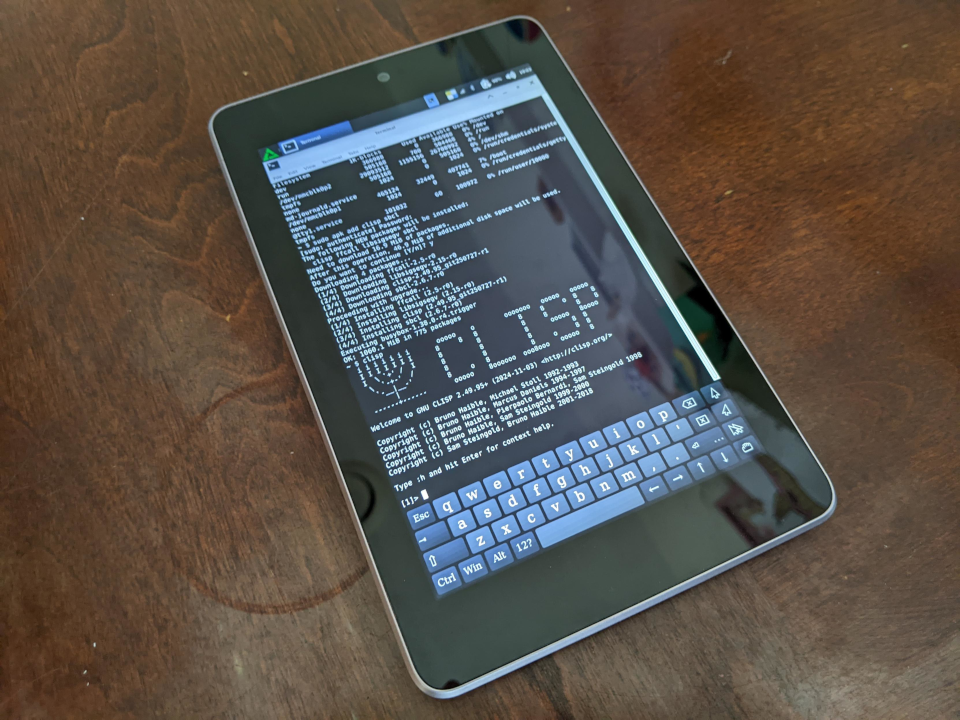
To celebrate, I installed my two favorite Common Lisp versions, SBCL and CLISP.
setting things up to be useful
At this point, aside from not having a good USB hub for the device, I pretty much have a cute little working Linux box, and I can install packages with apk, the tool for installing stuff on Alpine Linux. I just have to take a minute to configure everything (which will be quick; my config files for vim and so forth are in a git repository), cloning all my other repositories, seeing if I can get Obsidian for ARM to run on this thing; it has an AppImage...
Other than that, I just need to buy a USB hub for the Micro-USB port, hopefully one that lets me plug in a keyboard and mouse and potentially Ethernet, while powering the thing, and I'll have a very useful little Linux box for writing and a little light programming. I might mount it in a little briefcase, cyberdeck-style.
And that's that! Thanks for reading! I hope you put a useful Linux distro, possibly postmarketOS, on a device in your storage tub.